
In companies that work every day with many items, different prices and frequent staff queries, information easily gets scattered between Excel spreadsheets, emails and several programs. When data changes in one place, the question remains whether it has been updated everywhere else it is used.
A custom web application can bring together exactly the business processes that matter to a particular company. Instead of a general talk about digitalization, below we show what one such solution looks like: a system for product records, price list management and data checks by barcode scanning.
The example is based on the features of a business system we have developed. The visuals and the data in them are illustrative, not screenshots of a client’s application.
When Excel spreadsheets become an obstacle to everyday work
Excel is practical for simple records. The problem appears when several people work with the same data, when prices differ by customer, or when you need to find information about an item quickly.
Imagine a company where product data is kept in one spreadsheet, selling prices in another, and special terms for individual customers in additional documents. Every change requires checking several sources. Employees spend time looking for information instead of getting it right away.
In such a situation the goal is not necessarily to replace every existing program. The goal is to organize the data and steps that matter most to the company in one reliable system.
A practical example: centralized product records
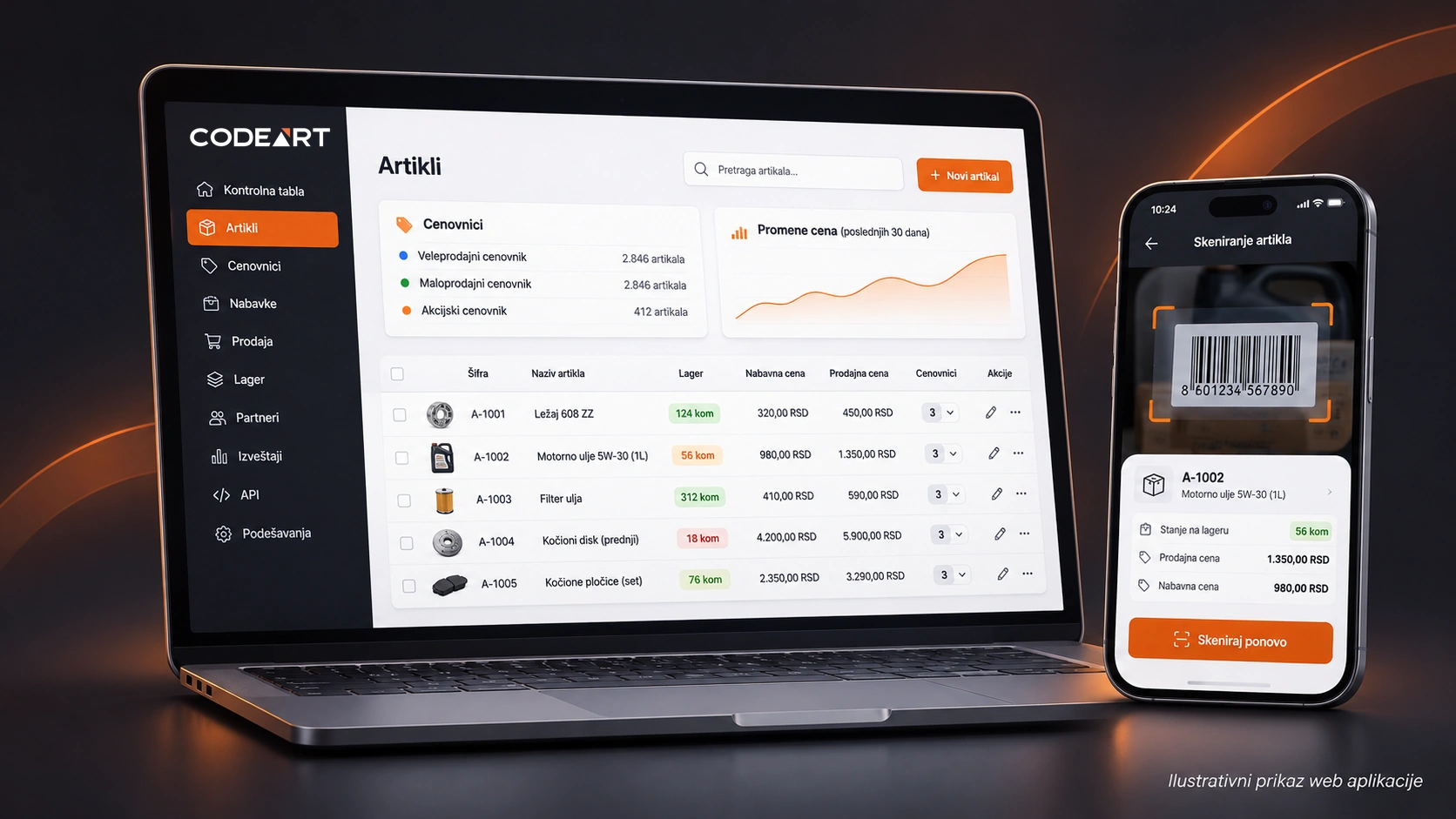
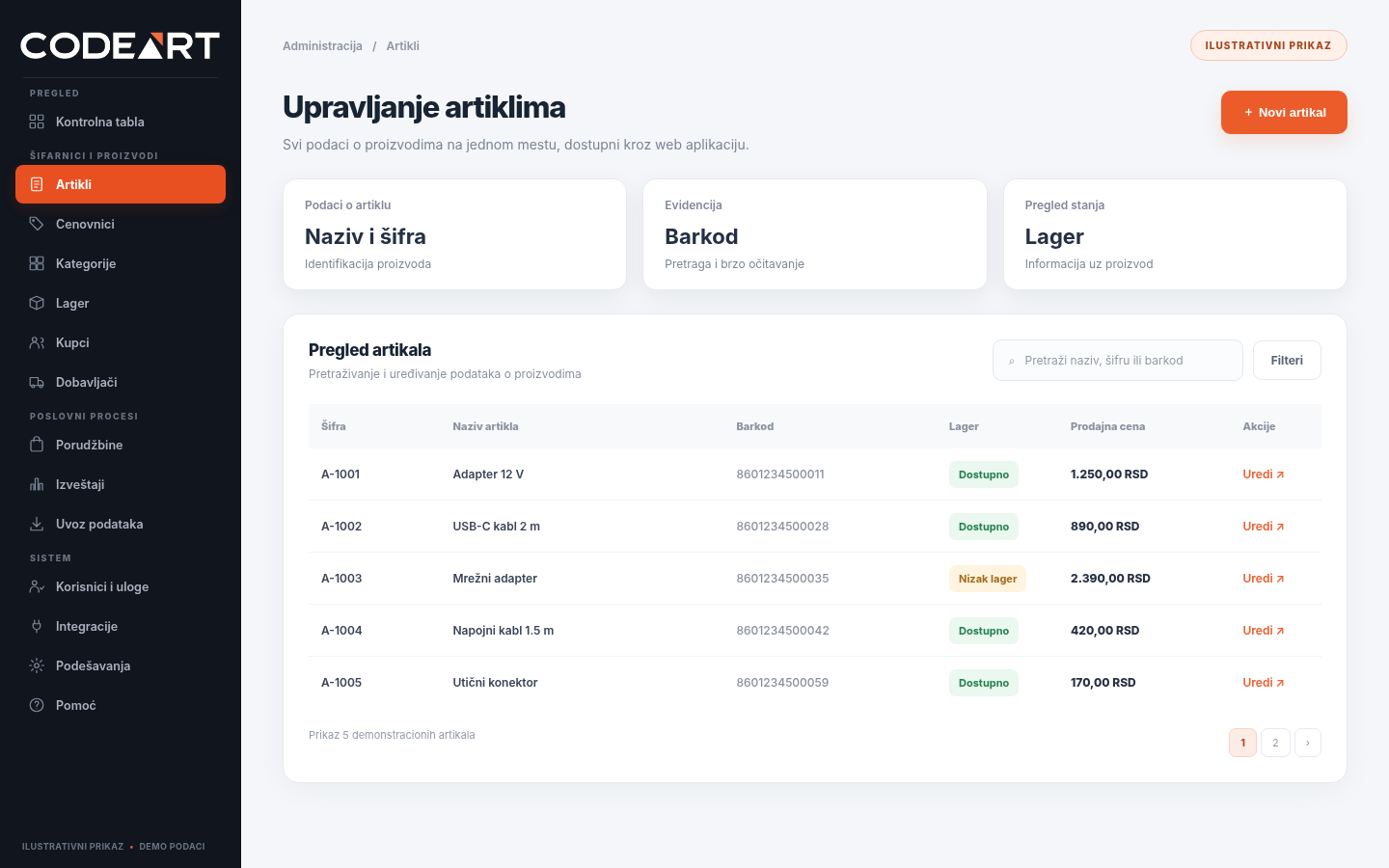
The foundation of the solution shown is a web administration panel in which items are managed through a central database. For a product you can record the code, name, barcode, unit of measure, description and stock information.
Users don’t have to remember which spreadsheet holds a particular item. They access the data through the product overview and, if needed, can edit it in the administration panel.
What does this approach bring? One place to view and maintain information, simpler search and a clearer foundation for other features of the application.
Multiple price lists for the same products – without duplicating records
One practical business requirement is that the same product can have a different price for different customers or sales terms.
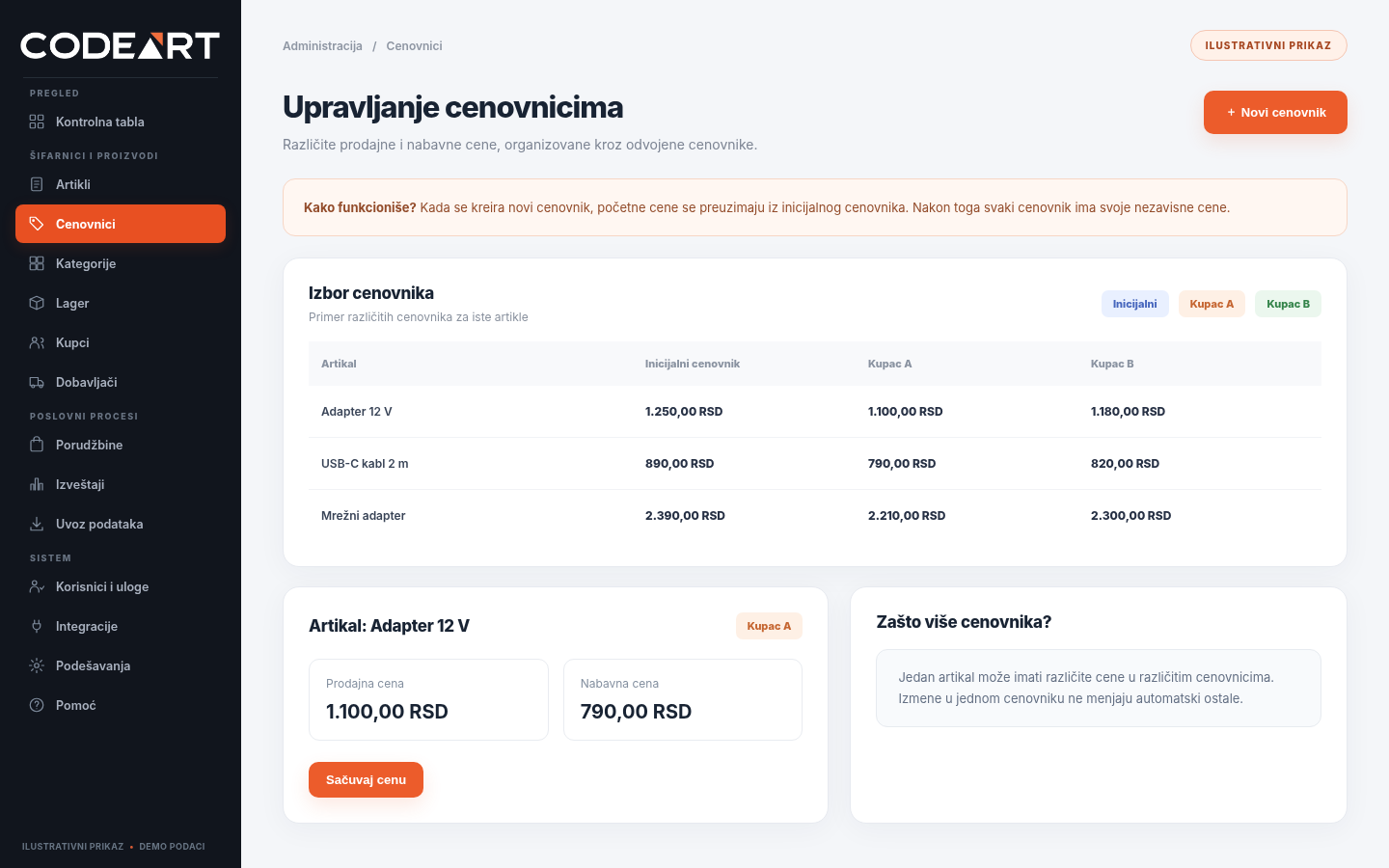
The system shown has an initial price list and the option of creating additional price lists. When a new price list is created, the selling and purchase prices are copied from the initial one as starting values. After that, prices in different price lists can be edited independently.
For example, a product has one price in the initial price list and other prices in price lists intended for different customers. Changing the price in one additional price list does not automatically change the price in the others.
This solution is especially useful for companies with a large number of products and different commercial terms. Instead of creating several unconnected lists, items stay in the same record, while prices are managed separately.
Checking items by scanning barcodes
Business data is not useful only to employees sitting at a computer. Sometimes you need to check a product directly in the warehouse, on the shop floor or at another location.
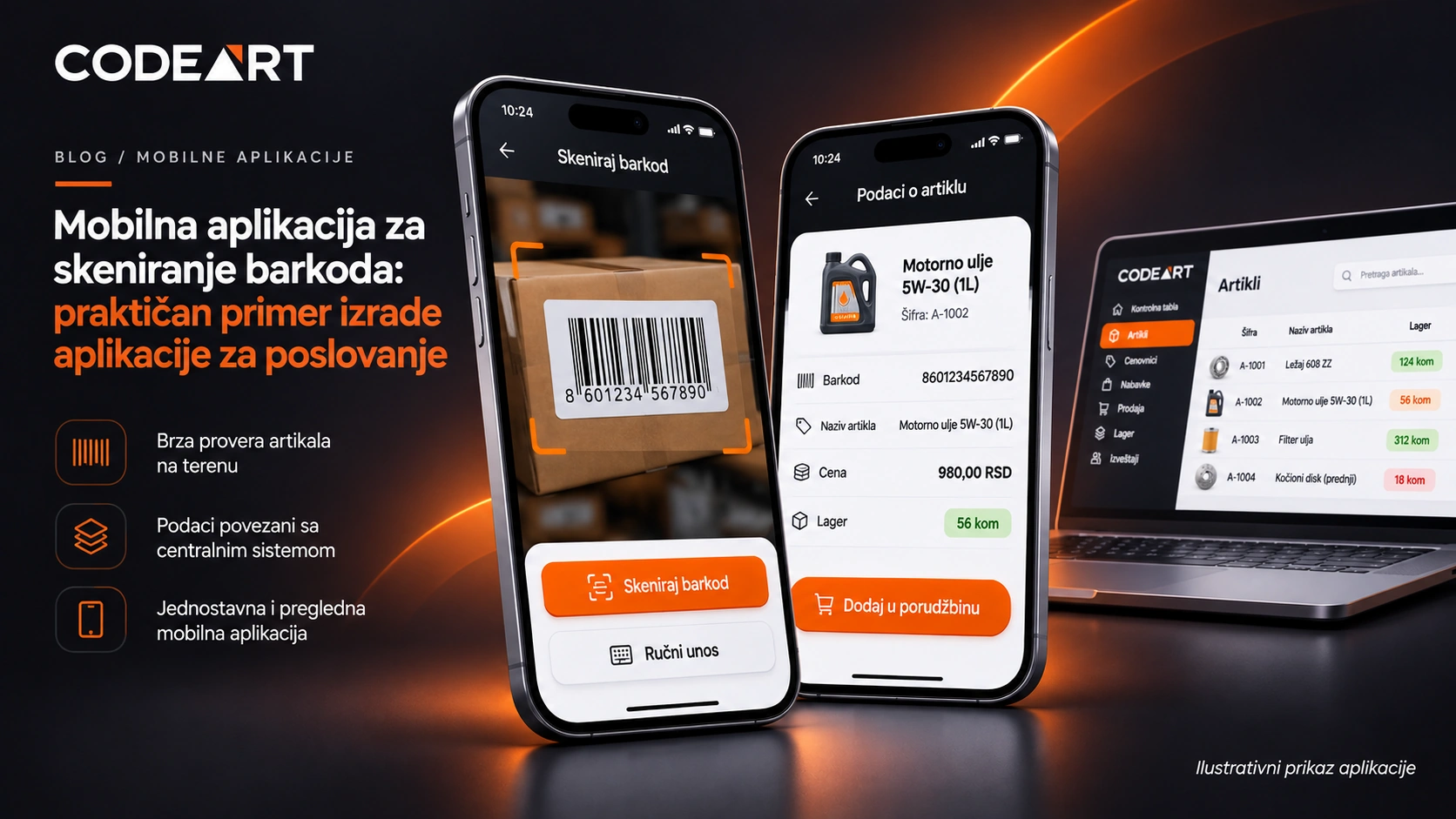
That is why, in this example, the web system is connected to a mobile app for barcode scanning. An employee can read the barcode with the phone camera or enter it manually. The mobile app then sends a query to the Laravel API and shows the data for the item found, such as name, price and stock.
It is important that the mobile app does not have to maintain its own separate product records. It uses the data provided by the central system. In this particular flow, the price data comes from the initial price list.
This is a good example of how a web application, an API and a mobile app can work as connected parts of a single business solution.
What does a business process look like in such an application?
Let’s take a simplified scenario with a single product:
- Item entry: an employee in the administration panel adds the name, code, barcode and other required data.
- Price setup: prices for the item are recorded in the initial price list, and additional price lists are created if needed.
- Changing special terms: the price for a specific customer is changed in their price list, without changing prices in other price lists.
- Quick check: an employee scans the barcode with a mobile phone and gets the item’s data from the central records.
This is not a showcase of “software that does everything”, but an example of how a few well-connected features fit the way a company actually works.
Why choose a custom web application over off-the-shelf software?
Off-the-shelf business software is often a perfectly good choice when a company has standard processes and the existing capabilities suit it. Introducing such a tool can be faster and simpler than developing a new system.
Developing a custom web application makes sense when there are specific requirements that off-the-shelf software has trouble covering: special rules for price lists, the way items are managed, custom user flows, or the need to connect several different systems.
The advantage of a tailored solution is not only in how it looks. The point is that features are planned around the business process, not the other way around.
Can the application be extended later?
It can, provided that a suitable structure is planned from the start. A company doesn’t necessarily have to build all the features in the first phase.
For example, the initial version might cover item records and price lists. In later phases you could consider additional reports, user roles, automation of certain procedures, or integration with an ERP system, accounting software and a web store.
Such integrations depend on the capabilities of the existing systems and need to be analyzed separately. They are not automatically part of every project.
What does building a business web application look like?
At CodeArt, development starts with understanding the specific problem, not with choosing a programming language.
Business analysis. First we define who uses the application, what information they need and which steps currently take the most time.
Feature and user interface plan. Then we decide what goes into the first version and how employees will work in the system.
Development and integration. The required modules, databases and API communication are built, along with integrations when they are part of the agreed scope of the project.
Testing and further development. Key business scenarios are tested, and the system is improved as needed when requirements change.
To develop such systems we use technologies such as Laravel, while React Native can be used for mobile apps. Technology matters for maintaining and extending the solution, but what matters most to the user is that the application reliably does the job it was built for.
Frequently asked questions about custom web applications
Is a web application used through an internet browser?
Yes. A web application is most often accessed through a browser, without a separate installation on every computer. The way of access and data protection is determined according to the needs of the project.
Can a web application be connected to existing programs?
In many cases it can, through an API or another way of exchanging data. Before development, you need to check which connection options the existing programs actually support.
Can there also be a mobile app?
Yes. The web administration panel can be the central place for data, and the mobile app a separate interface for tasks such as barcode scanning and viewing information.
How much does a custom web application cost?
The price depends on the number of features, the complexity of business rules, design, user roles, integrations and the scope of testing. That is why, for a realistic estimate, you first need to define the needs and the scope of the first version of the application.
Is there a business process that could work more simply?
If your employees look for the same information in several places, copy data from one program to another or use unconnected spreadsheets, it may be time to consider a custom business web application.
CodeArt develops web applications tailored to specific business needs. Tell us about your current process and the problem you want to solve – together we can define a solution that makes sense for your company.
Note: This content is an example of functionality based on experience developing a business system. All illustrations and values shown are for demonstration and are not an actual screenshot or client data.